All Coursework
JavaScript: "Lights Off"
A simple interactive puzzle web page.
This coursework is about JavaScript (not Python).
JavaScript is used extensively on the internet to provide web pages with
dynamic content. JavaScript programs are often written
directly within HTML web pages, and they are run by the Web Browser when
it loads the page.
Obviously you are not expected to master JavaScript programming in the
last few weeks of this module. Thus you are given a template HTML file
with an almost complete JavaScript program already coded in it.
You will need to read a bit about JavaScript so you understand the
basic elements of its syntax. But the basic principles of algorithms
are coded in JavaScrip are in many ways quite close to Python. So your
knowledge of Python should enable to carry out the limited coding
tasks required for this assignment.
For this coursework you will create a Javascript program that
implements the simple puzzle known as Lights Off.
You should start with the template file lights_off.html (which you
can download using the link below). That file contains HTML and Javascript code that,
when opened in a browser,
will display a grid of buttons and implements a function toggle(i,j)
that switches the state of the button at position (i,j) in the grid between
the yellow O state (on) and the black X state (off).
- [3 Marks]
Add code to the lights_off.html file to display a heading and brief information about the game
and ensure that this text and the grid are centred on the page. Thus, the web page seen when the
lights_off.html is viewed in a browser should look similar to this:
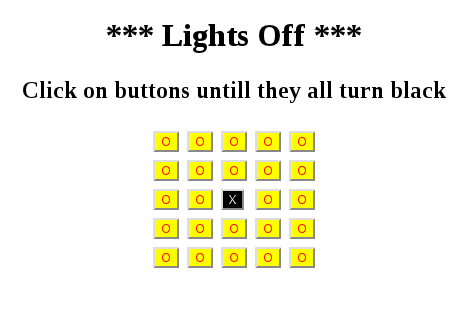
- [4 Marks]
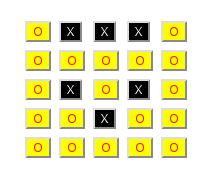
Modify the press function so that, as well as toggling the state of the button actually
pressed, the state of buttons above, below, left and right of the button pressed are also
toggled. Thus, if one presses the centre button followed by the middle button of the top
row, one should see the following changes:
| Pressing the centre button gives: |
Then pressing the middle button of the top row gives: |
 |
 |
- [3 Marks]
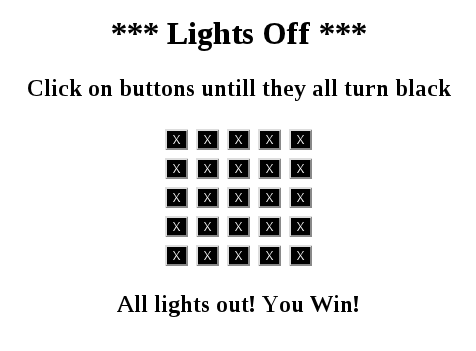
Further modify the press function so it
also includes a call to a function checkAllOff(), which you
need to write. checkAllOff() should test whether all buttons
are in the off state (i.e. black); and if this is the case it
should display the a message indicating the puzzle has been solved
(as shown opposite). This function should also remove the message
if, following a subsequent press, one or more buttons returns to the
on state.
Starting Template File
Since lights_off.html is an HTML file, it is difficult to create
a download link to it because most browers will just show it as a web page.
To get a copy of lights_off.html you can either use the link to
view the HTML source, then copy and past from there, or you can right click
on the link to view as web page and select "Save Link As ...".
Submission Instructions
You should submit via the submission widet on the Assessment
page of the module's Minerva pages.
Your submission should be in the form of a zip file
lights_off.zip containing your extended version
of lights_off.html. (Minerva will not allow submission
of HTML files for some reason.)
You can create this zip file by downloading the file
cw4_checkout.py, copying it to the same directory
as your lights_off.html and then running
cw4_checkout.py.